1. Empathise: Understanding the Developer Context
Management had a theory about what was wrong. I wanted to see it, so I sat with 10 developers across seniority levels and watched them do ordinary things: find an API, set up an environment, work out what depended on what. Watching beats asking here — people forget the workarounds they've stopped noticing.
Survey Data Highlights (N=150)
| Upgrade Readiness Awareness | 100% |
| Primary Communication for Support | Outlook / Teams |
| Technical Adoption Rate (Reference App) | 80% |
| Interest in Internal Community Forums | 71% |
Key Pain Points Identified
- Steep Learning Curve for MFEModular architecture had no structured onboarding, so developers reverse-engineered documentation written for senior architects — driving high error rates in initial setup.
- Fragmented ConnectivityTools, compliance forms, and API docs were scattered across inconsistently branded SharePoint sites, forcing constant context-switching.
- Outdated DocumentationWritten guides lagged behind actual platform capabilities, so developers trusted informal knowledge-sharing over official resources.
- Support Gaps & Synchronous DependencyPoor self-serve options pushed developers onto synchronous Teams support, turning lead engineers into ad-hoc help desks.
Developer's Work-Life Ecosystem Details
Two numbers made the case: developers waited up to three weeks for environment configuration and documentation access before writing a first API call, and 20% of code failed in staging purely from local environment variance.
2. Define: Establishing Target Profiles and Journeys
Two people kept showing up in the research, and they wanted opposite things. I wrote them down so every later decision had something concrete to argue with.
Ramya
Intermediate Developer
Ramya needs step-by-step guidance to set up her environment and understand how MFEs work — clear "Getting Started" docs and error messaging matter most. Her goal: a faster "Time to First Hello World."
Ramesh
Senior Architect
Ramesh needs fast, unencumbered access to raw API specs, version control switching, and performance analytics. His goal: maintain system integrity while increasing team velocity.
The Developer Journey
I mapped the journey from "Project Assignment" to "First Successful Deployment." The legacy path spanned 14 touchpoints across 5 systems with manual approval gates; the redefined journey collapsed this into one portal with automated provisioning and contextual documentation.
Current-State User Journey: The Developer Experience
Macro-Phase 1: Set up & start building
Step 1
Discovering COSMOS
Actions
Rely on word-of-mouth or stumble upon the COSMOS Design system Home page.
Friction: Major gap in initial discoverability. Only found if already in use.
Step 2
Onboarding
Actions
Meet Product team, get access, training, read FAQs and architecture docs.
Friction: Raising access requests from multiple sources is highly time-consuming.
Step 3
Getting Started
Actions
Interact with Cosmos, API docs, set up Dev env, MFE Generator, Open hours.
Friction: Steep learning curve; reliant on "Open hours" support.
Macro-Phase 2: Building products
Step 4
Development
Navigate resources (JS/React guides), manage upgrades & security.
Friction: No ready-made codes, low discoverability of reference app.
Step 5
Testing
Conduct Unit Testing and raise defects to Library team.
Friction: Raising defects is unstructured, increasing resolution times.
Step 6
Production
Pass code through the team's automated quality checks (internally called the "FED Scorecard") before it's considered production-ready.
Step 7
Maintenance
Version upgrades, public release updates, community contribution.
warning
Systemic Journey Blockers
- cancel Fragmented Information: Repetitive content across various URLs.
- cancel Lack of Sequencing: Difficult to understand correct steps to follow.
- cancel Zero Self-Service: Dependent on "Open hours" support.
- cancel Poor Cross-Discoverability: Siloed information.
- cancel Missing MFE Support: Little to no MFE-specific material available.
3. Ideate: Structuring the Solution Architecture
Then the question became which of these to actually build. I ranked ideas on two things only: could engineering realistically ship it, and would it remove a step from someone's day.
The 'Big Ideas' Matrix
Automated Starter CodeA simple visual tool for generating starter components in one step, already wired to the company's security standards and style rules.
Integrated Sandbox EditorsEmbedding a live code editor directly in the documentation, so developers can test API calls and try out components without first setting up a project on their own machine.
System Architecture DiagramsVisualizing how systems connect with clear, interactive diagrams, helping developers see what depends on what before making changes.
Switching Between VersionsAn always-visible switch that lets senior engineers move between API versions and documentation states without losing their place in the portal.
Information Architecture & Flows
I cut the site structure right back. Instead of organising by internal team or org chart, I organised around what developers were actually trying to do. The primary navigation was reduced to four verbs: Discover (APIs & Components), Build (Tools & Starter Code), Learn (Documentation & Patterns), and Manage (Infrastructure & Access). I tested the structure with senior engineering leads before anything got built.
4. Design: From Wireframes to High-Fidelity Execution
This audience notices when you patronise them. The interface had to carry a lot of information without feeling dumbed down — engineers read dense screens all day and don't thank you for hiding things.
Wireframing Core Utilities
Low-fidelity wireframes established a modular grid for dense data tables, code snippet blocks, and multi-pane navigation. The core goal: get a new user from landing page to starter-code download in under three clicks, validated in iterative reviews with engineering.
Visual Design & System Integration
The visual system stayed monochromatic, with brand color reserved for interactive states and status indicators, and a single type scale — Inter — across both UI and long-form documentation for a consistent reading experience. I documented interaction behavior for modals, nested dropdowns, and code blocks, with spacing and structural annotations precise enough for pixel-perfect handoff.
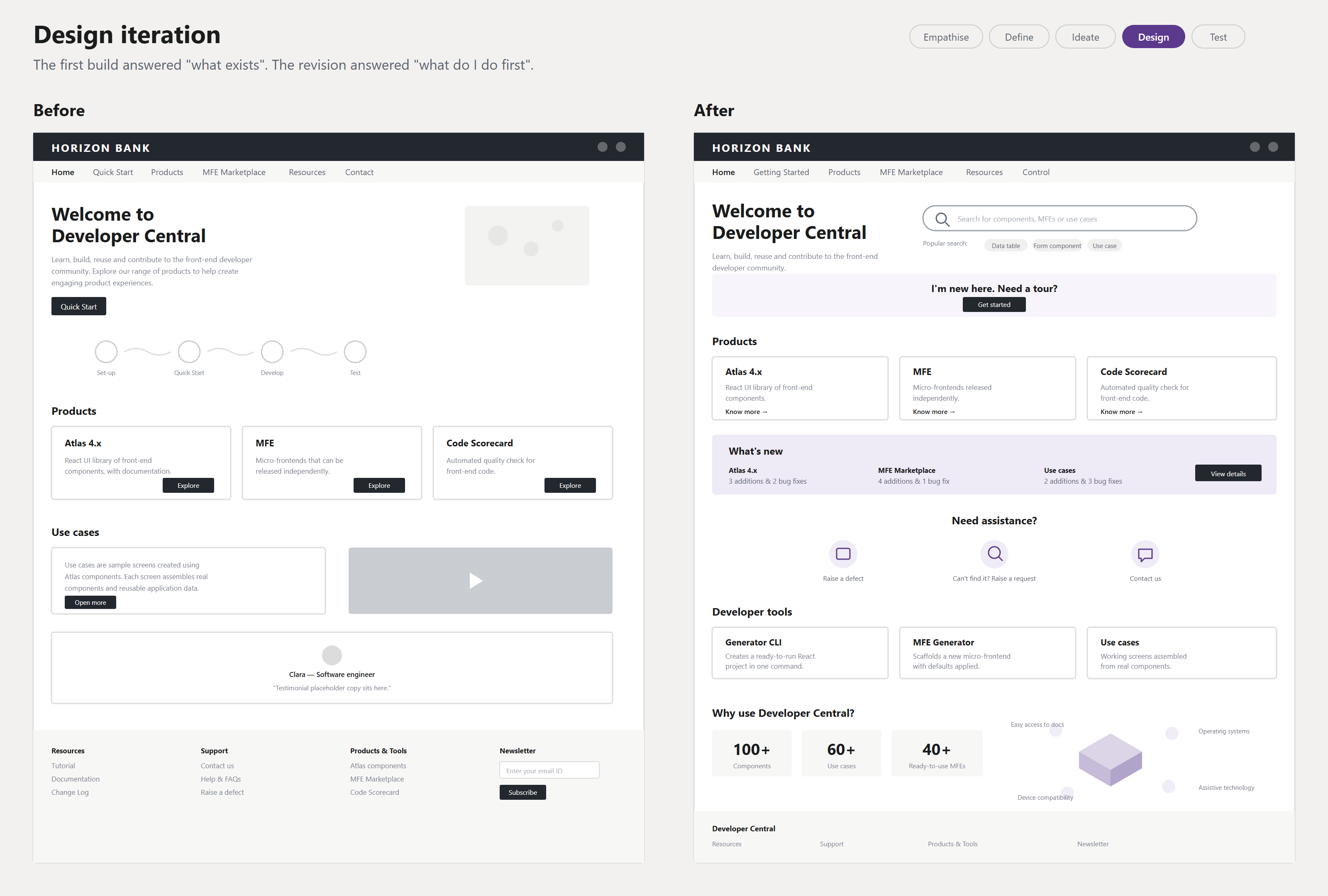
The first build answered "what exists here". Testing showed new developers were asking something else first — "what do I do now" — so the revision leads with search and a guided path instead of a product catalogue. Screens redrawn with client branding removed.
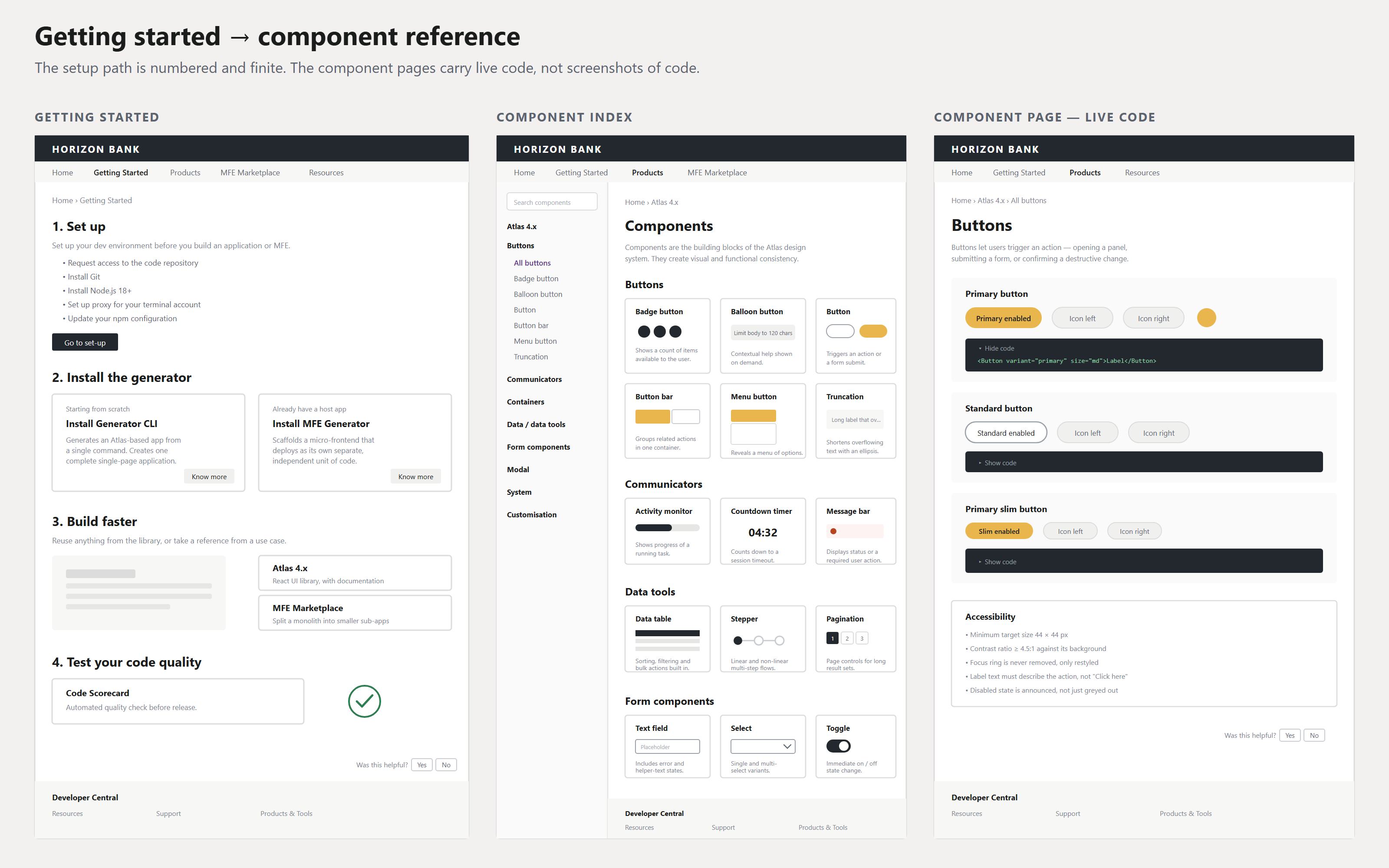
Setup was rebuilt as a numbered, finite path, and every component page carries copyable live code plus its accessibility rules — so the documentation answers the question at the point the developer has it.
Documentation & Playground Solution Details
Documentation had the same problem as the rest of the platform: scattered across PDF specs and Confluence with no live playground, so developers deployed to staging just to inspect a payload response. An integrated live sandbox let them validate API contracts in real time instead.
5. Test & Results: Project Impact
Post-launch validation combined quantitative analytics with qualitative feedback loops built into the new portal.
| Metric Area | Legacy System (Before) | Design (After) |
|---|
| Search & Discovery | Fragmented across 3 platforms | Unified Central Hub |
| Onboarding Time | Manual, mentor-dependent (Weeks) | Self-service guided paths (Days) |
| Technical Utility | Static, disconnected documentation | Interactive code gen & integrated editors |
| Onboarding lead time | — | ↓ 65% |
| Integration bugs | — | ↓ 35% |
FED Scorecard metrics improved alongside these. The larger shift was architectural and cultural: from a page-building mindset to a node-based, interoperable one — and treating internal developers with the same rigour as external users, which turned a utility people avoided into a platform teams chose.
The hardest constraint was serving both ends of the Ramya-to-Ramesh spectrum in one interface — simplifying enough for a first-time user without stripping away the raw control power users like Ramesh needed, which meant almost every screen went through a round of "is this too much, or not enough."
Phase 2 — Extending Developer Central with AI
Status: Piloted. The figures in this section are projected, based on pilot data — not yet measured at full production scale.
Phase 1 solved centralisation. But research surfaced a deeper problem: developers weren't blocked because information didn't exist — they were blocked because finding it, and converting it into working code, took real effort. The next step wasn't better documentation navigation. It was AI embedded in workflows developers already used, rather than another standalone tool.
Research Insights
Our generative research revealed two recurring pain points across beginner and experienced developers.
Insight 01
"I need ready-made code to start faster."
New developers spent considerable time configuring their environment, understanding COSMOS dependencies, and manually writing repetitive starter code before getting to the actual business logic.
Insight 02
"I know the documentation exists. I just can't find it."
Resources were distributed across COSMOS, API documentation, GitHub repositories, migration guides, and internal learning platforms. Developers spent more time searching than building.
Design Opportunity
The two highest-impact opportunities to evolve Developer Central from a documentation portal into an intelligent development assistant were:
- AI-Assisted MFE Code Generation: Eliminating the "Getting Started" bottleneck.
- Smarter Search & Discoverability: Finding answers instead of documents.
Solution 01
AI-Assisted MFE Code Generation
Project setup was the single most painful moment for new developers — exactly where Insight 01 hit hardest.
Our Design Approach
Instead of creating another AI application, we enhanced the existing MFE Generator already available inside Developer Central. Developers drag UI components from the COSMOS design system onto a visual canvas, and the AI generates ready-to-use code for them — properties, imports, and dependencies already wired up — ready to check against the team's existing quality standards (the FED Scorecard).
Design Principle
Rather than replacing developers, AI removes repetitive setup work while keeping developers in control of implementation. Developers spend time solving business problems—not writing repetitive starter code.
80%
Projected reduction in project setup time
65%
Projected reduction in Level-1 support requests
40%
Projected MFE adoption increase within one quarter
Solution 02
Smarter Search & Discoverability
Research consistently showed that developers already knew the documentation existed. The real challenge was knowing where to look. Traditional keyword search required developers to understand document names, repositories, and platform structure before they could search.
Our Design Approach
Rather than designing new search UI, we replaced the underlying search engine with one that understands the meaning behind a question, not just its keywords. The existing global search bar became an AI-powered knowledge assistant.
search
"How do I change a button to Standard Skin in React?"
Instead of returning dozens of matching files, Developer Central now provides a direct answer with the relevant code snippet, links to the exact COSMOS component, and related migration guides.
Retrieves knowledge from:
COSMOS Component Library
API Registry
Migration Documentation
Release Notes
65%
Projected reduction in search time
Self-Service
Resolve implementation questions independently
Unified Knowledge
One source for all framework knowledge
Workflow Comparison
Before
Search Docs
↓
Open Multiple Platforms
↓
Read Documentation
↓
Ask Support
↓
Write Starter Code
↓
Start Development
≈ Several hours to days
After
Open Developer Central
↓
Ask AI / Generate MFE
↓
Receive Working Code
↓
Validate with FED Scorecard
↓
Start Development
≈ Minutes
User Feedback
"Earlier I had to wait for someone to help me set up COSMOS. Now I simply drag the components I need, and the generator creates everything for me. I can start building immediately."
— Beginner Developer
"Instead of searching across multiple platforms, I ask a question and immediately receive the exact implementation with links to the correct documentation. It finally feels like one developer platform."
— Senior Developer
"Routine onboarding questions have reduced significantly. Instead of answering repetitive setup issues, we can now focus on improving the platform itself."
— Platform Support Team
Reflection
This phase moved Developer Central from somewhere you look things up to something that helps you do the work.
The clearest guardrail was scope: the generator stayed limited to the repetitive starter code every project needs, with architecture and business-logic decisions always left to the developer — widening that scope carelessly would have been the fastest way to erode trust in the tool.